<?xml version="1.0" encoding="utf-8"?>
<feed xmlns="http://www.w3.org/2005/Atom">
   <title>Smart Goat</title>
   <link rel="alternate" type="text/html" href="http://www.smartgoat.com/" />
   <link rel="self" type="application/atom+xml" href="http://www.smartgoat.com/feed/atom.xml" />
   <id>tag:www.smartgoat.com,2007-06-29://1</id>
   <updated>2008-10-29T21:57:10Z</updated>
   <subtitle>Web Development and Design</subtitle>
   <generator uri="http://www.sixapart.com/movabletype/">Movable Type Pro 4.34-en</generator>

<entry>
   <title>Register Now for OpenBeta</title>
   <link rel="alternate" type="text/html" href="http://www.smartgoat.com/blog/register_now_for_openbeta/" />
   <id>tag:www.smartgoat.com,2008://1.1091</id>
   
   <published>2008-10-29T12:56:00Z</published>
   <updated>2008-10-29T21:57:10Z</updated>
   
   <summary> Tomorrow, the first OpenBeta conference will be held in Oklahoma City. Today is the last day to register, so if you haven&#8217;t already, sign up now. The SmartGoat herd will be in attendance, so if you see us milling...</summary>
   <author>
      <name>Billy Mabray</name>
      <uri>http://www.newsgoat.com/</uri>
   </author>
   
      <category term="Blog" scheme="http://www.sixapart.com/ns/types#category" />
   
   
   <content type="html" xml:lang="en" xml:base="http://www.smartgoat.com/">
      <![CDATA[<p><img src="http://www.smartgoat.com/images/openbeta-sm.png" width="254" height="100" alt="OpenBeta" class="imgright" style="border:0; float:right" /> Tomorrow, the first <a href="http://openbeta.extendedbeta.com">OpenBeta</a> conference will be held in Oklahoma City. Today is the last day to register, so if you haven&#8217;t already, sign up now. The SmartGoat herd will be in attendance, so if you see us milling about, be sure to say hi.</p>

<p>This is an exciting time for the technology community in Oklahoma. In the past couple of years we&#8217;ve seen increased interest in coming together, sharing ideas, and supporting local talent. This conference is an extension of that and, based on current attendance estimates, should be a great success.</p>

<p>Hope to see you there.</p>
]]>
      

   </content>
</entry>

<entry>
   <title>Learn More About Movable Type</title>
   <link rel="alternate" type="text/html" href="http://www.smartgoat.com/blog/learn_more_about_movable_type/" />
   <id>tag:www.smartgoat.com,2008://1.994</id>
   
   <published>2008-04-23T13:00:00Z</published>
   <updated>2008-04-23T03:53:46Z</updated>
   
   <summary>We use Movable Type quite a bit here&#8212;it powers most of our blogs, and even some sites that aren&#8217;t blogs. Recently, I began writing a series of articles at Devlounge about Movable Type templates. The first couple of articles explain...</summary>
   <author>
      <name>Billy Mabray</name>
      <uri>http://www.newsgoat.com/</uri>
   </author>
   
      <category term="Blog" scheme="http://www.sixapart.com/ns/types#category" />
   
   <category term="movabletype" label="movable type" scheme="http://www.sixapart.com/ns/types#tag" />
   <category term="writing" label="writing" scheme="http://www.sixapart.com/ns/types#tag" />
   
   <content type="html" xml:lang="en" xml:base="http://www.smartgoat.com/">
      <![CDATA[<p>We use <a href="http://movabletype.org">Movable Type</a> quite a bit here&#8212;it powers most of our blogs, and even some sites that aren&#8217;t blogs. Recently, I began writing a series of articles at <a href="http://www.devlounge.net">Devlounge</a> about <a href="http://www.devlounge.net/author/billymabray">Movable Type templates</a>. The first couple of articles explain how the MT templating system works. Future posts will give tips and tricks for creating templates to enhance your site. If you use MT, or if you&#8217;re considering it for a future project, I hope you&#8217;ll head over there and take a look. If you have a question please post it in the comments and I&#8217;ll try to respond either with my own comment or a future article on the topic.</p>
]]>
      

   </content>
</entry>

<entry>
   <title>Making Changes</title>
   <link rel="alternate" type="text/html" href="http://www.smartgoat.com/blog/making_changes/" />
   <id>tag:www.smartgoat.com,2008://1.797</id>
   
   <published>2008-02-18T06:11:08Z</published>
   <updated>2008-02-18T06:33:15Z</updated>
   
   <summary>We&#8217;re making some changes here at Smart Goat and wanted to make everyone aware of what is going on. I&#8217;ve been offered a full-time position with a media company here in Oklahoma City, and I&#8217;ve accepted it. That means I&#8217;ll...</summary>
   <author>
      <name>Billy Mabray</name>
      <uri>http://www.newsgoat.com/</uri>
   </author>
   
      <category term="Blog" scheme="http://www.sixapart.com/ns/types#category" />
   
   
   <content type="html" xml:lang="en" xml:base="http://www.smartgoat.com/">
      <![CDATA[<p>We&#8217;re making some changes here at Smart Goat and wanted to make everyone aware of what is going on. I&#8217;ve been offered a full-time position with a media company here in Oklahoma City, and I&#8217;ve accepted it. That means I&#8217;ll be scaling back to just part-time at Smart Goat.</p>

<p>What does this mean for our clients? We&#8217;ve been in touch with all of them to let them know what to expect. It&#8217;s likely this won&#8217;t affect most of them. Whether you&#8217;re a current client or not, you should still feel free to <a href="/contact/">contact us</a> whenever you need our help with your website. If we can help you, we will. If we can&#8217;t, we&#8217;ll put you in touch with someone who can.</p>
]]>
      

   </content>
</entry>

<entry>
   <title>Clients are from .com, Developers are from .net</title>
   <link rel="alternate" type="text/html" href="http://www.smartgoat.com/blog/clients_are_from_com_developer/" />
   <id>tag:www.smartgoat.com,2008://1.725</id>
   
   <published>2008-01-21T18:40:00Z</published>
   <updated>2008-05-01T04:19:17Z</updated>
   
   <summary>I was recently interviewed for an article at Online Merchant Network about talking to developers. I recommend reading it&#8212;everyone quoted gives good advice. Since the interview, I&#8217;ve thought a bit more about communication between web developers and their clients. We...</summary>
   <author>
      <name>Billy Mabray</name>
      <uri>http://www.newsgoat.com/</uri>
   </author>
   
      <category term="Blog" scheme="http://www.sixapart.com/ns/types#category" />
   
      <category term="Recommended" scheme="http://www.sixapart.com/ns/types#category" />
   
   <category term="blogging" label="blogging" scheme="http://www.sixapart.com/ns/types#tag" />
   <category term="clients" label="clients" scheme="http://www.sixapart.com/ns/types#tag" />
   <category term="communication" label="communication" scheme="http://www.sixapart.com/ns/types#tag" />
   <category term="development" label="development" scheme="http://www.sixapart.com/ns/types#tag" />
   <category term="email" label="email" scheme="http://www.sixapart.com/ns/types#tag" />
   
   <content type="html" xml:lang="en" xml:base="http://www.smartgoat.com/">
      <![CDATA[<p>I was recently interviewed for an article at Online Merchant Network about <a href="http://www.onlinemerchantnetwork.com/blog/article?blog.id=tech_integration&amp;message.id=14">talking to developers</a>. I recommend reading it&#8212;everyone quoted gives good advice.</p>

<p>Since the interview, I&#8217;ve thought a bit more about communication between web developers and their clients. We do come from different worlds, but with a common goal: a successful launch. Communication is one of the most important and most difficult parts of any project. It&#8217;s a skill I&#8217;m still working to improve, but I thought I would share a few things I&#8217;ve learned.</p>
]]>
      <![CDATA[<h2>Communicate Preemptively</h2>

<p>There&#8217;s a reason almost every website has a frequently asked questions (FAQ) list: In any business, you tend to get the same basic questions over and over. If you can compile those questions and provide the answers in one place you can save potential customers the trouble of asking.</p>

<p>In many ways, this blog is our FAQ. We try to address questions we hear often from clients. We also try to explain things we think our clients need to know to run an effective website.</p>

<p>A business looking to build a website can communicate preemptively as well. Before you start looking for a developer, make notes about what your website should accomplish. Try to dig deeper than &#8220;make money&#8221; or &#8220;drive traffic.&#8221; I recommend printing our <a href="/rfp/">Request for Proposal</a> form and trying to answer as many of the questions as possible. Whether or not you end up working with us, it&#8217;s a useful exercise for understanding how a website fits into your business.</p>

<h2>Have Something to Talk About</h2>

<p>While you may have in your head a perfect picture of what your website should be like, it can be difficult to convey that to a developer. It&#8217;s usually easier to find examples that are similar to what you want. Obviously, you&#8217;re not going to find something that matches your vision perfectly, and your developer is not just going to copy someone else&#8217;s site. But, concrete examples can go a long way toward expressing your vision.</p>

<p>Similarly, when we build a site, we like to get as much information from the client as possible, then build a &#8220;first draft&#8221; example. Then we can go back and forth with the client to improve various aspects of the site. This gives us something real to test and discuss, rather than trying to get everything nailed down before we start. It&#8217;s much easier to perfect something real than something theoretical.</p>

<h2>Get Out of Your Comfort Zone</h2>

<p>For me, the best way to communicate is via email. I can ignore it when I&#8217;m working, and deal with it in batches when I&#8217;m ready. I also like having a written record I can refer back to when necessary. I think a lot of developers are like this.</p>

<p>In my experience, though, clients almost never prefer to communicate this way. They usually prefer phone calls or in-person meetings. And it makes sense. We don&#8217;t work with other technology companies, we work with companies that do business with a handshake and a smile. Typically, building a website is the biggest technological leap they&#8217;ve ever made.</p>

<p>In this clash, I think it&#8217;s important for both sides to give a little. Developers need to make the occasional phone call to give their clients the personal attention they need. It also helps the client feel like there is a real person behind the emails, one that cares about the success of the project. Clients need to make an effort to do some communication by email, and get comfortable using other online tools the developer may offer. Some or all of their business is now on the Web, and they are going to find more and more of their customers trying to reach them online. I particularly recommend this for clients who are not comfortable with email, IM, etc. Practice with your developer&#8212;they will be the most forgiving people you meet as you&#8217;re learning how to communicate effectively online.</p>

<h2>Keep Communicating</h2>

<p>Probably the most important advice I can give is to keep the conversation going. I know from personal experience how letting weeks go by without any discussion can really put a strain on a working relationship. It&#8217;s easy to get caught up in another project and forget to call, or feel like there&#8217;s nothing worth talking about. But regular communication, even if it&#8217;s just a weekly email, can go a long way toward keeping a project on track.</p>

<p><em>Have some advice on communicating? <a href="/contact/">Let us know</a> about it.</em></p>
]]>
   </content>
</entry>

<entry>
   <title>Last-Minute Ideas For Attracting Last-Minute Shoppers</title>
   <link rel="alternate" type="text/html" href="http://www.smartgoat.com/blog/lastminute_ideas_for_attractin/" />
   <id>tag:www.smartgoat.com,2007://1.719</id>
   
   <published>2007-12-07T00:10:00Z</published>
   <updated>2007-12-07T00:33:13Z</updated>
   
   <summary> We&#8217;re in the holiday home stretch, with Christmas just a few weeks away. Here at the Smart Goat Ranch, blogging will be light till after the first of the year. But we wanted to share a few tips with...</summary>
   <author>
      <name>Billy Mabray</name>
      <uri>http://www.newsgoat.com/</uri>
   </author>
   
      <category term="Blog" scheme="http://www.sixapart.com/ns/types#category" />
   
   <category term="ecommerce" label="ecommerce" scheme="http://www.sixapart.com/ns/types#tag" />
   <category term="holidays" label="holidays" scheme="http://www.sixapart.com/ns/types#tag" />
   
   <content type="html" xml:lang="en" xml:base="http://www.smartgoat.com/">
      <![CDATA[<p><span class="mt-enclosure mt-enclosure-image"><img alt="Santa Goat in his red suit and hat" src="http://www.smartgoat.com/images/santagoat.jpg" width="260" height="344" class="mt-image-right" style="float: right; border: 0"/></span> We&#8217;re in the holiday home stretch, with Christmas just a few weeks away. Here at the Smart Goat Ranch, blogging will be light till after the first of the year. But we wanted to share a few tips with you for luring in those last-minute shoppers to your website:</p>
]]>
      <![CDATA[<ul>
<li>Give Free Shipping &#8212; Shoppers love the convenience of shopping online, but shipping charges often make them hesitate. Eliminate that stumbling block by offering free shipping for orders above a certain amount. You&#8217;ll increase sales and reduce the number of shopping carts abandoned before checkout. Even better if you offer free shipping directly to the gift recipient.</li>
<li>Provide Deadlines &#8212; Be sure you post &#8220;last days&#8221; for ordering gifts to arrive before Christmas. <a href="http://www.usps.com/holiday/mailing-holiday-deadlines.htm?from=holidayhome&amp;page=mailingdeadlines">USPS</a>, <a href="http://pressroom.ups.com/holiday/calendar">UPS</a>, and <a href="http://www.fedex.com/us/holiday/shipping/lastdaystoship.html">FedEx</a> all have holiday delivery schedules to help you plan.</li>
<li>Sell Gift Wrapping &#8212; Gift wrapping is a great add-on, because it&#8217;s profitable for you, but relatively cheap for your customers. It saves shoppers a lot of time during the busy holiday season. Plus, they don&#8217;t have to worry about kids sneaking a peek before they&#8217;ve had a chance to wrap packages!</li>
<li>Advertise Gift Certificates &#8212; When they just can&#8217;t find the right present, customers fall back to gift certificates. Be sure your certificates are advertised prominently on your home page, and available in any amount. If it&#8217;s an online gift certificate, generate a nice-looking certificate they can print for the recipient.</li>
<li>Offer Gift Baskets &#8212; Combine several smaller products into a single gift set. Pre-filled Christmas stockings are also popular.</li>
<li>Make Recommendations &#8212; Make a page that explains who would enjoy your products. Offer suggestions based on relationship (&#8220;gifts for moms&#8221;) and lifestyle (&#8220;athletes&#8217; favorites&#8221;). Keep this page updated year round&#8212;it will be useful for other gift-giving events, and great for SEO.</li>
</ul>

<p>Online shoppers have a lot of choices, and it&#8217;s often not price that makes the difference, but convenience. Help your customers get a lot done, and they&#8217;ll keep coming back.</p>

<p>To all our clients and readers we wish a successful and trouble-free holiday season. Most importantly, we hope you and your families enjoy the holidays together and have a wonderful new year.</p>
]]>
   </content>
</entry>

<entry>
   <title>Common Copyright Myths</title>
   <link rel="alternate" type="text/html" href="http://www.smartgoat.com/blog/common_copyright_myths/" />
   <id>tag:www.smartgoat.com,2007://1.699</id>
   
   <published>2007-10-24T17:36:58Z</published>
   <updated>2007-11-29T20:53:40Z</updated>
   
   <summary> There&#8217;s a lot of moments I enjoy while I&#8217;m creating a client&#8217;s website. That first meeting, when they tell me all about their business and I can see the passion they have for what they do. When the CSS...</summary>
   <author>
      <name>Billy Mabray</name>
      <uri>http://www.newsgoat.com/</uri>
   </author>
   
      <category term="Blog" scheme="http://www.sixapart.com/ns/types#category" />
   
      <category term="Recommended" scheme="http://www.sixapart.com/ns/types#category" />
   
   <category term="copyright" label="copyright" scheme="http://www.sixapart.com/ns/types#tag" />
   
   <content type="html" xml:lang="en" xml:base="http://www.smartgoat.com/">
      <![CDATA[<p><img src="http://www.smartgoat.com/images/copyrat.gif" width="260" height="260" alt="Cartoon mouse with the words Copy Rat around it" style="border:0; float:right;" /> There&#8217;s a lot of moments I enjoy while I&#8217;m creating a client&#8217;s website. That first meeting, when they tell me all about their business and I can see the passion they have for what they do. When the CSS is done, and the site looks remarkably similar to the original mock-up. And, of course, when the site finally launches.</p>

<p>There are moments I don&#8217;t enjoy, though. One of those usually happens like this:</p>

<dl>
<dt>Client (showing me a digital photo):</dt><dd>&#8220;Hey, I want to use this on the website.&#8221;</dd>
<dt>Me:</dt><dd>&#8220;Great! That looks perfect. Where was this taken?&#8221;</dd>
<dt>Client:</dt><dd>&#8220;I don&#8217;t know, I found it on the Internet.&#8221;</dd>
<dt>Me:</dt><dd>&#8220;Oh&#8230;&#8221;</dd>
</dl>
]]>
      <![CDATA[<p>It&#8217;s a really sad moment, because the client has just shown how enthusiastic she is about the website, and I have to burst her bubble and tell her we can&#8217;t use that, because we don&#8217;t have permission. Unfortunately, this happens a lot, and it&#8217;s not really surprising. Copyright law has changed a lot in our lifetime, so there&#8217;s a lot of outdated information about it still being passed around. Here are some of the myths I hear a lot that affect businesses and their websites:</p>

<ul>
<li><p><em>&#8220;To copyright something, mail it to yourself and don&#8217;t open it.&#8221;</em> &#8212; This is not necessary for copyright. According to U.S. law, the moment you create something, no matter what you do with it, you have a copyright. But if you&#8217;re concerned someone might try to claim they created the work first, go ahead and send it to yourself &#8212; it&#8217;s a cheap, easy way to record <strong>when</strong> you created something.</p>

<p><strong>Update:</strong> Johnathan Lyons wrote in with some thoughts on this:</p>

<blockquote>
  <p>[this] is actually a common myth as well. Even an unopened certified letter can be easily steamed open and its contents replaced (or so the defense will claim), so the &#8220;mailed it to myself&#8221; proof of copyright is ineffective and somewhat counter productive.</p>
  
  <p>The best way to do it, is gather all of the work you want to protect and file it with the US Patent, trademark and Copyright office as your &#8220;Collected Works&#8221; for a single filing fee. I believe the charge is about $35.</p>
</blockquote>

<p>I hadn&#8217;t thought about it that way, but he&#8217;s right&#8212;there&#8217;s no way that envelope is going to stand up in court, so it&#8217;s probably a waste of time.</p></li>
<li><p><em>&#8220;If it&#8217;s on the Internet, it&#8217;s not copyrighted.&#8221;</em> &#8212; Actually, almost the opposite is true. With the exception of those things old enough to be in the public domain, or specifically released by their creators into the public domain, everything online is copyrighted.</p>

<p>So where can you go to find images you can use? When you&#8217;re looking for clip art or stock photography, it&#8217;s best to skip Google and go straight to a <strong>royalty-free</strong> image website. We use <a href="http://istockphoto.com">iStockPhoto</a> a lot&#8212;the quality and variety is good, and the prices are relatively inexpensive. You can also use <a href="http://search.creativecommons.org/">search engines</a> that specifically find works released under a <a href="http://creativecommons.org">Creative Commons (CC)</a> license. Artists use Creative Commons to indicate they are ok with certain uses of their works. Always be sure your use is compatible with the work&#8217;s CC license. And if a photograph includes people, keep in mind that a CC license does not excuse you from needing a <a href="http://en.wikipedia.org/wiki/Model_release">model release</a>.</p></li>
<li><p><em>&#8220;It&#8217;s not copyright infringement if you change the original work by at least 10%.&#8221;</em> &#8212; Wrong, and this one&#8217;s easy to test: Go buy <em><a href="http://www.amazon.com/exec/obidos/ASIN/B000VBJEEG/smartgoat-20">Ratatouille</a></em> on DVD. Then, on your home computer, replace the middle 11 minutes with your own drawings of mice. Release it online, and see which comes first&#8212;your Academy Award nomination, or a cease-and-desist from Disney.</p>

<p>It is possible to use an existing work within your own work&#8212;it&#8217;s called fair use&#8212;but there&#8217;s no magic percentage that makes it legal. If your work is a parody, or uses a very short piece of an existing work for illustrative purposes, you&#8217;re ok. There are other fair use provisions as well, but it&#8217;s a pretty gray area, and courts tend to err on the side of the copyright owner.</p></li>
<li><p><em>&#8220;Images that come with your computer are ok to use.&#8221;</em> &#8212; Applications like Microsoft Office come with a lot of clip art, and you might think you could use the images for anything. There are restrictions, however. Often, those restrictions prohibit commercial and/or online use. In the case of Office, Microsoft licenses its clip art from multiple vendors, so different images can have different use restrictions.</p>

<p>Your software should have an End User License Agreement (EULA) within it (or on the vendor&#8217;s website) that will explain any use restrictions. Again, it&#8217;s usually best to stick with royalty-free or Creative Commons material.</p></li>
<li><em>&#8220;You can&#8217;t take photos of somebody else&#8217;s house without their permission.&#8221;</em> &#8212; While you certainly can&#8217;t go <em>inside</em> someone else&#8217;s house and take pictures without their permission, you can take photos outside without any problems. Generally, anything visible from the street can be legally photographed.</li>
</ul>

<p>Copyright is very important in our business, so I do my best to keep up with the current laws. However, I cannot stress enough how much I am not a lawyer. While I do believe this is good advice, it&#8217;s best to consult with an attorney <em>that specializes in intellectual property</em> if you have a copyright issue.</p>

<p>Are there copyright concerns you&#8217;ve heard and wondered whether or not they were true? Or myths you know aren&#8217;t true that I didn&#8217;t cover? <a href="/contact/">Send them to me</a> and I&#8217;ll compile them for a future post.</p>
]]>
   </content>
</entry>

<entry>
   <title>Target Accessibility Case</title>
   <link rel="alternate" type="text/html" href="http://www.smartgoat.com/blog/target_accessibility_case/" />
   <id>tag:www.smartgoat.com,2007://1.205</id>
   
   <published>2007-10-19T04:02:13Z</published>
   <updated>2007-10-19T04:26:08Z</updated>
   
   <summary>The court case that I mentioned briefly before was back in the news recently as a California court agreed the case could go forward as a class action suit. As Jeremy Keith points out, this ruling has brought some disappointing...</summary>
   <author>
      <name>Billy Mabray</name>
      <uri>http://www.newsgoat.com/</uri>
   </author>
   
      <category term="Blog" scheme="http://www.sixapart.com/ns/types#category" />
   
   <category term="accessibility" label="accessibility" scheme="http://www.sixapart.com/ns/types#tag" />
   <category term="law" label="law" scheme="http://www.sixapart.com/ns/types#tag" />
   
   <content type="html" xml:lang="en" xml:base="http://www.smartgoat.com/">
      <![CDATA[<p>The court case that I <a href="http://www.smartgoat.com/blog/understanding_web_accessibilit/">mentioned briefly before</a> was <a href="http://www.theregister.co.uk/2007/10/14/california_target_web_accessibility/">back in the news</a> recently as a California court agreed the case could go forward as a class action suit.</p>

<p>As <a href="http://adactio.com/journal/1359/">Jeremy Keith points out</a>, this ruling has brought some disappointing reactions from some people in the web community. I wasn&#8217;t particularly surprised by this&#8212;I saw the same uninformed comments when this lawsuit began. However, I have been pleasantly surprised by the mainstream media coverage I&#8217;ve seen. In each case, the news correspondent&#8212;even though they clearly did not understand the technology behind web accessibility&#8212;asked the right question:</p>

<blockquote>
  <p><em>If Target can make their website accessible to the blind, why wouldn&#8217;t they?</em></p>
</blockquote>

<p>And the answer is pretty simple: There is no reason not to. They can, and they should. Target has already made some progress on improving their website, hopefully the threat of a class action lawsuit will be the incentive they need to finish the job.</p>
]]>
      

   </content>
</entry>

<entry>
   <title>Email Like You Mean It</title>
   <link rel="alternate" type="text/html" href="http://www.smartgoat.com/blog/email_like_you_mean_it/" />
   <id>tag:www.smartgoat.com,2007://1.23</id>
   
   <published>2007-09-27T19:31:20Z</published>
   <updated>2007-09-28T00:19:02Z</updated>
   
   <summary>We&#8217;ve talked before about sending great email newsletters to your customers. But what about the rest of your emails? What do they say about you and your company? It&#8217;s very easy to shoot off a quick email, so most people...</summary>
   <author>
      <name>Billy Mabray</name>
      <uri>http://www.newsgoat.com/</uri>
   </author>
   
      <category term="Blog" scheme="http://www.sixapart.com/ns/types#category" />
   
      <category term="Recommended" scheme="http://www.sixapart.com/ns/types#category" />
   
   <category term="email" label="email" scheme="http://www.sixapart.com/ns/types#tag" />
   
   <content type="html" xml:lang="en" xml:base="http://www.smartgoat.com/">
      <![CDATA[<p><span class="mt-enclosure mt-enclosure-image"><img alt="Email" src="http://www.smartgoat.com/images/email.jpg" width="260" height="252" class="mt-image-right" style="float: right; border: 0"/></span>We&#8217;ve talked before about <a href="http://www.smartgoat.com/blog/how_to_send_great_customer_ene/">sending great email newsletters</a> to your customers. But what about the rest of your emails? What do they say about you and your company?</p>

<p>It&#8217;s very easy to shoot off a quick email, so most people don&#8217;t put much thought into it. But it&#8217;s like any other way you communicate: people are going to form an impression about you&#8212;not just on what you say, but on how you say it. So if you&#8217;re going to say something with email, say it like you mean it. Write it with conviction and style, in a way that makes your intentions clear.</p>
]]>
      <![CDATA[<p>Since I spend a big part of each day communicating through email, I put together this list of etiquette tips. Follow these and you&#8217;ll improve the quality of your emails:</p>

<ul>
<li><strong>Use a meaningful subject line</strong> &#8212; A good, concise subject line can be difficult to create, but it will grab the receiver&#8217;s attention. It can also help keep your message out of the spam folder. If you&#8217;re emailing a customer, include your company name in the subject line: &#8220;Your contract from Smart Goat Web Design&#8221;. I find it helps to wait till after I&#8217;ve written the body of the email to write the subject line. At that point, I know exactly what the email is about and I can summarize it better.</li>
<li><strong>Be careful about attachments</strong> &#8212; Once you get used to broadband Internet, it&#8217;s easy to forget a lot of people still use dial-up. Sending large attachments to someone on a slow connection can cause a major headache for the recipient. For anything over a megabyte, it&#8217;s best to ask before you send. Or, upload the file to your website (or to a file-sending service like <a href="http://yousendit.com">YouSendIt</a> or <a href="http://mediafire.com">MediaFire</a>), then email the person a link to download the file.</li>
<li><p><strong>Default to plain text</strong> &#8212; Many email programs offer a variety of ways to add images, colors, and different fonts to your emails. But before you try all those options in one email, ask yourself if it really adds anything to your message. Chances are it doesn&#8217;t, and will instead distract from your content. There is not yet a standard for HTML email, so there&#8217;s a chance the styles of your message will get garbled upon delivery.</p>
<p>If you&#8217;re using Outlook, you can default to sending plain text by going to <em>Options</em> under the <em>Tools</em> menu and selecting the <em>Mail Format</em> tab.</p></li>
<li><strong>Turn caps lock off</strong> &#8212; Some business applications require everything to be entered in capital letters, so some people get into the habit of typing this way. But on the Internet, writing in all caps is considered yelling, so it&#8217;s not appropriate for business emails. It&#8217;s also harder to read&#8212;part of the way we recognize whole words is by their shapes. You lose that shape when all the letters are the same height, and it slows down your reading.</li>
<li><strong>Use proper capitalization and punctuation</strong> &#8212; Following basic style guidelines will make your email more attractive and easier to read. Be sure to do these simple things:
<ul>
<li>Capitalize proper nouns and the first letter of the first word of each sentence.</li>
<li>End each sentence with a period, exclamation mark, or question mark.</li>
<li>Double-space between paragraphs. In fact, dividing your message into logical paragraphs will make it much more readable.</li>
</ul></li>
<li><strong>Use your spell checker</strong> &#8212; Odds are, your email program has a built-in spell checker. Run it at least once before sending your message. Many email programs have the ability to do this automatically when you hit the <em>Send</em> button.</li>
<li><p><strong>Trim quotes in a reply</strong> &#8212; When replying, it&#8217;s rare that you need to quote the other person&#8217;s entire email in your response. Trim the quoted text down to only the part you are replying to, and type your reply directly below their message. This creates a very concise and easy-to-read email with a question followed immediately by the answer. So, with an email like this:</p>
<pre><strong>From:</strong> Client
<strong>To:</strong> Billy
<strong>Subject:</strong> Improving our Accessibility
Billy,

The latest changes you sent look great. Go ahead and put them up on 
the site as soon as you can.

One other thing, I want to improve the accessibility of our site. What do 
we need to do to accomplish that?

Thanks,   
Jane Q. Client  
Client Company, Inc.  
http://www.example.com  
(405) 555-1234  
The absolute best clients since 1891!</pre>

<p>I would reply like this:</p>

<pre><strong>From:</strong> Billy
<strong>To:</strong> Client
<strong>Subject:</strong> RE: Improving our Accessibility
On September 25, 2007, Client wrote:
&gt; One other thing, I want to improve the accessibility of our site.
&gt; What do we need to do to accomplish that?

Jane,

As it happens, I just wrote a blog post about that:

&lt;http://www.smartgoat.com/blog/understanding_web_accessibilit/&gt;

Read through that, then give me a call and we can discuss options.

Thanks,
-- 
Billy Mabray
Smart Goat Web Design
http://www.smartgoat.com
(405) 659-4822
</pre></li>
<li><strong>Include a short, informative signature </strong> &#8212; You might have noticed my email signature at the bottom of that reply. Your signature should be akin to your business card&#8212;a source for basic contact information. Email address is typically not necessary, since that&#8217;s part of the email itself. A favorite quote may or may not be appropriate, but a marketing &#8220;tag line&#8221; would be, especially if it tells something about what you do.</li>
</ul>

<p>Yes, it takes a bit longer to write emails like this, but it&#8217;s worth it. When you pay attention to small details, you demonstrate a certain level of professionalism. This makes your customers more confident in you, and more willing to do business with you. I&#8217;ve also found that sending people quality emails encourages them to reciprocate, which improves communication in both directions.</p>

<p>Before you hit <em>Send</em> on your next email, go back and read it as if you were the person receiving it. Are you impressed? Are you convinced the sender knows what they&#8217;re talking about? Does the meaning come through loud and clear? If not, see if you can rewrite it&#8230; like you mean it.</p>
]]>
   </content>
</entry>

<entry>
   <title>Understanding Web Accessibility</title>
   <link rel="alternate" type="text/html" href="http://www.smartgoat.com/blog/understanding_web_accessibilit/" />
   <id>tag:www.smartgoat.com,2007://1.22</id>
   
   <published>2007-09-13T22:10:09Z</published>
   <updated>2007-10-19T04:29:36Z</updated>
   
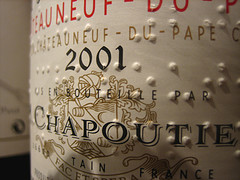
   <summary> Braille wine label by adactioWhat does it mean for a website to be accessible? Accessible for whom? Most of the time, we think of web accessibility as being for the blind. If your website is accessible, that means a...</summary>
   <author>
      <name>Billy Mabray</name>
      <uri>http://www.newsgoat.com/</uri>
   </author>
   
      <category term="Blog" scheme="http://www.sixapart.com/ns/types#category" />
   
      <category term="Recommended" scheme="http://www.sixapart.com/ns/types#category" />
   
   <category term="accessibility" label="accessibility" scheme="http://www.sixapart.com/ns/types#tag" />
   <category term="seo" label="seo" scheme="http://www.sixapart.com/ns/types#tag" />
   
   <content type="html" xml:lang="en" xml:base="http://www.smartgoat.com/">
      <![CDATA[<p><span class="mt-enclosure mt-enclosure-image mt-image-right" style="float: right; margin: 0 0 20px 20px; width: 240px; font-size: 0.8em; font-style: italic"><img alt="wine bottle with Braille on the label" src="/images/89778576_c53b2093e3_m.jpg" width="240" height="180" /> <a href="http://www.flickr.com/photos/adactio/89778576/">Braille wine label</a> by <a href="http://www.flickr.com/photos/adactio/">adactio</a></span>What does it mean for a website to be accessible? <strong>Accessible for whom?</strong></p>

<p>Most of the time, we think of web accessibility as being for the blind. If your website is accessible, that means a blind person using a screen reader can navigate it successfully and access everything that is there.</p>

<p>But there&#8217;s a little more to it than that.</p>

<p>First off, web accessibility isn&#8217;t just for the blind. It&#8217;s for all of us. It&#8217;s for anyone whose eyesight isn&#8217;t what it used to be. It&#8217;s for anybody whose hand-eye coordination isn&#8217;t perfect. It&#8217;s really for anybody who accesses the web. All users benefit from an accessible site&#8212;and you benefit as well, with more visitors having a better experience at your site.</p>

<p>But this begs the question: <strong>If accessibility is so great, why is <a href="http://news.bbc.co.uk/1/hi/technology/6210068.stm" title=" 'Most websites' failing disabled">nobody doing it</a>?</strong></p>
]]>
      <![CDATA[<h3>Accessible sites: Ugly and Boring?</h3>

<p>A lot of people think accessible sites can&#8217;t have any images or, well, anything but text, really. This isn&#8217;t true at all. For some good examples, browse through the <a href="http://www.gawds.org/poll/">Guild of Accessible Web Designers&#8217; Site of the Month competition</a>. You&#8217;ll find some <strong>beautifully designed websites</strong> that are <strong>very accessible</strong>. Or, check out <a href="http://www.jkrowling.com/accessible/en/">JK Rowling&#8217;s official website</a>&#8212;an <strong>all Flash site</strong> that breaks almost every stereotype about accessibility.</p>

<h3>Different levels of accessibility</h3>

<p>There are generally three levels of accessibility: <strong>Great, Good,</strong> and <strong>Poor. Great accessibility</strong> can be difficult, and is typically only achieved by <a href="http://www.accessify.com/">accessibility-related organizations</a>. It involves having your site tested in a variety of screen reader programs by people who use the software on a regular basis. You also have to be sure that any software you use &#8212; such as ecommerce payment gateways &#8212; meets or exceeds <a href="http://www.w3.org/TR/WAI-WEBCONTENT/">standard accessibility guidelines</a>. Great accessibility takes a great deal of time and attention to detail.</p>

<p><strong>Good accessibility</strong> is easy. Good accessibility means following the <a href="http://www.w3.org/TR/WAI-WEBCONTENT/">standard accessibility guidelines</a> as corrected by the <a href="http://wcagsamurai.org/">WCAG Samurai</a>. It means <a href="http://www.smartgoat.com/blog/the_importance_of_web_standard/">following web standards</a> and doing the little things that make your website easier to use by everyone. Things like:</p>

<ul>
<li>Providing <strong>descriptive alternate text</strong> for important images on your site, and <strong>no alternate text for purely decorative images</strong>. This will make your site much more pleasant to listen to.</li>
<li>Designing forms so that clicking the label &#8212; the <strong>text next to the checkbox</strong> (or text box, or whatever) &#8212; works just like clicking directly on the box. I don&#8217;t know about you, but I find as I get older, the checkboxes get smaller, and my aim gets worse.</li>
<li>Make <strong>text resizable</strong>, so that users without 20/20 vision can adjust the font size to a comfortable level.</li>
</ul>

<p>A site with good accessibility may not be perfect, but it will be miles ahead of most of its competitors.</p>

<p><strong>Poor accessibility</strong> is, unfortunately, very common. And it really shouldn&#8217;t be&#8212;it&#8217;s so easy to achieve a good level of accessibility, there&#8217;s no excuse for doing less. Now, here I have to admit, we have built some sites in the past that were not particularly accessible. Our only excuse is that we built those sites before we knew about accessibility. That doesn&#8217;t lessen our responsibility, though. We are <strong>actively working to fix/replace those sites</strong>, and when we do, we&#8217;ll write about how easy it was.</p>

<h3>So what&#8217;s in it for you?</h3>

<p>Besides the good feeling you get from making your site accessible, there are many tangible benefits. First, you keep yourself out of trouble. U.S. government websites are required to meet <a href="http://www.section508.gov/">Section 508 guidelines</a> for accessibility. And some retailers are <a href="http://www.usatoday.com/news/nation/2006-10-25-blind_x.htm">learning the hard way</a> that the Americans with Disabilities Act (ADA) applies online.</p>

<p>That&#8217;s the stick, now here&#8217;s the carrot: <strong>Better accessibility means more visitors.</strong> If a user with disabilities can&#8217;t navigate your site, they&#8217;ll go somewhere else. Likewise, if someone with a mobile device like a cell phone can&#8217;t navigate your site, they&#8217;ll simply try somewhere else. You can keep those users sticking around by creating an accessible site.</p>

<p>Don&#8217;t forget, <strong>your most important visitor is blind</strong>&#8212;Google. When search engines visit your site, the main thing they do is read the text. Their experience is very similar to that of a blind user. By creating a better experience for disabled users, you create a better experience for Google. And when Google likes your site, it tells all its friends.</p>

<h3>Are you accessible?</h3>

<p>While there are <a href="http://www.contentquality.com/">automated tests</a> for checking your site&#8217;s accessibility, there&#8217;s no substitute for professional review. <a href="/contact/">Contact us</a> if you would like us to review your site and make suggestions for improvement, or if you would just like more information on accessibility.</p>
]]>
   </content>
</entry>

<entry>
   <title>The Importance of Web Standards</title>
   <link rel="alternate" type="text/html" href="http://www.smartgoat.com/blog/the_importance_of_web_standard/" />
   <id>tag:www.smartgoat.com,2007://1.21</id>
   
   <published>2007-09-06T03:09:02Z</published>
   <updated>2007-09-06T21:58:17Z</updated>
   
   <summary> If you&#8217;ve read much about web design or web development, you&#8217;ve probably seen the phrases &#8220;web standards&#8221; or &#8220;standards-based design&#8221; thrown around. It&#8217;s one of those topics that&#8217;s very important to web professionals, but we have a difficult time...</summary>
   <author>
      <name>Billy Mabray</name>
      <uri>http://www.newsgoat.com/</uri>
   </author>
   
      <category term="Blog" scheme="http://www.sixapart.com/ns/types#category" />
   
   <category term="webstandardsdevelopment" label="webstandards development" scheme="http://www.sixapart.com/ns/types#tag" />
   
   <content type="html" xml:lang="en" xml:base="http://www.smartgoat.com/">
      <![CDATA[<p><img src="/images/valid-xhtml10-blue.png" alt="W3C XHTML 1.0" class="figure right" style="border:0" /> If you&#8217;ve read much about web design or web development, you&#8217;ve probably seen the phrases &#8220;web standards&#8221; or &#8220;standards-based design&#8221; thrown around. It&#8217;s one of those topics that&#8217;s very important to web professionals, but we have a difficult time explaining the significance to our clients. That&#8217;s because the difference isn&#8217;t always easy to see &#8212; often, you can&#8217;t just put a standards-based site next to a non-standard site and say, &#8220;See, <em>that&#8217;s</em> why standards are better.&#8221; So I thought it would be helpful if I tried to explain the benefits we see from web standards and why, regardless of who builds your website, you should demand it be standards based.</p>
]]>
      <![CDATA[<h3>Web standards &#8212; The blueprints of the Web</h3>

<p>Most of us, at some time or other, have had to assemble something. Maybe your kid&#8217;s bicycle, or a piece of furniture, or maybe even a car. Did it come with instructions? Did you read the instructions? <strong>All</strong> the instructions?</p>

<p>Web standards are the instructions we use to assemble websites. The <a href="http://w3.org">World Wide Web Consortium (W3C)</a> was established in 1994 to establish standards for emerging web technologies. Those standards are written for two groups of people: the web browser (Internet Explorer, Firefox, Safari, Opera, etc.) makers and the website makers (That&#8217;s us!). </p>

<p>Unlike a Schwinn, web browsers are pretty forgiving if you don&#8217;t follow the instructions. By forgiving I mean that if your web page code is incorrect, they make an educated guess as to what you really meant to do. That being the case, it&#8217;s easy to see why a lot of designers and developers have ignored the standards over the years and just did what worked. And while that&#8217;s perfectly fine for a personal web page, a business site should take advantage of the benefits provided by web standards.</p>

<h3>Lower Costs</h3>

<p>The primary cost savings we see with web standards is in maintenance. It is far easier and faster to update a standards-based website. The code is simpler and better organized. If we need to change the color of headlines it&#8217;s a single change in the code, rather than the multiple changes it often takes without the use of standards.</p>

<h3>Better SEO</h3>

<p>Search engines are trusting creatures. They have to be. Everything they need to know to do their jobs, they get from us. So if we tell them something is important, they believe us&#8212;until they see evidence we&#8217;re trying to con them. But if we don&#8217;t try to con them, if we&#8217;re nice to them and tell them what matters on our web pages, they will be nice to us and tell the world about us.</p>

<p>Web standards are an important part of this. The standards are designed to give meaning to the text and images on your website. Remember, the web was original built for sharing scientific documents. Because of this, the code is designed to create a hierarchical structure. By using this structure, we can tell search engines what our websites are about.</p>

<h3>Easy Accessibility</h3>

<p>Web standards are essential to making websites accessible to those with disabilities. The <a href="http://www.w3.org/WAI/intro/wcag.php">Web Content Accessibility Guidelines (WCAG)</a> require that websites use valid code. In our experience, accessibility is the &#8220;free prize&#8221; that comes with web standards. Yes, you do have to do more than simply write valid code, but once your code is valid, everything else you need to do is fairly easy.</p>

<p>Also, keep in mind that accessibility doesn&#8217;t just benefit those with disabilities. A website built according to the standards is more accessible to a greater number of devices as well. The market for cell phones and other hand-held devices that access the Internet is growing, and a standards-based site is going to be easier to adapt for those customers.</p>

<p>If you want to learn more about the benefits of web standards, I recommend the <a href="http://icant.co.uk/webstandardsforbusiness/">Business Case for Web Standards wiki</a> created by Chris Heilmann. It&#8217;s a place for web professionals to collaborate on arguments and case studies for web standards. And if you want more information about building or redesigning a site with web standards, feel free to <a href="/contact/">contact us</a>.</p>
]]>
   </content>
</entry>

</feed>